Showing posts with label studio. Show all posts

Tuesday, 15 October 2013

Do not underestimate the power!

One of the weaknesses of my recording set-up has been the speakers. I've been using the Yamaha YSTM20DSP speakers that came with the PC I bought many years ago. They are not as bad as some computer speakers, but you can't expect much bass from such small units.

I've been eyeing up various monitors for some time. There's a vast price range, but I was aiming at the lower end. I know people who have the KRK Rokit and like them. I eventually managed to get some money put aside, but had to set my sights slightly lower. The M-Audio BX5 D2 looked good. One problem is the lack of places where you can actually go and try out the various options, especially if you are looking at the lower end models. I've been mostly going my reviews and forum postings. Gearslutz has plenty of opinions, but may just leave you overwhelmed.

Then I saw the Studiospares Seiwin monitors. These were a similar price to the BX5, but with bigger speakers and more power. The reviews I found were positive, so I decided to take a chance on them. +Studiospares Ltd is near where I work and I've driven past them hundreds of times without going in. I popped in last week to buy these. They had a deal that included some isolation pads and I found some cheap (balanced) cables. They were friendly in there. I will probably be back some time.

So I got them home and set up. First impressions are good. I can just hear so much more. Not just the bass, but the drums are also much clearer. Vocals seem to come from a point just in front of me. Listening to some Björk was a wonderful experience.

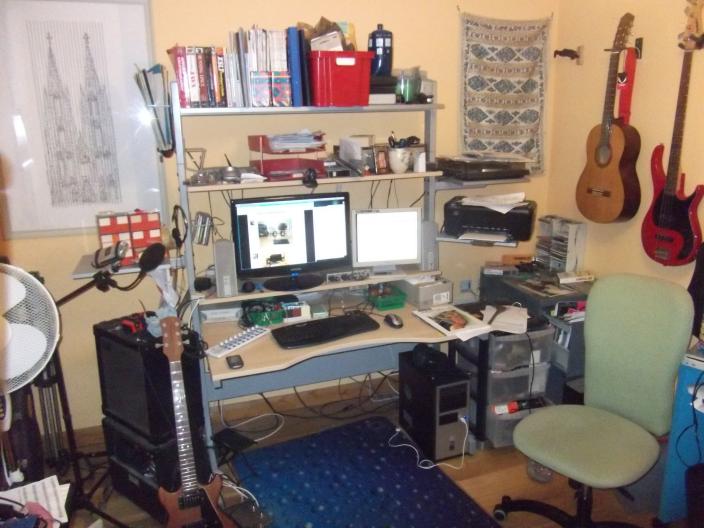
I'm using the swiveling shelves on the sides of my Ikea Jerker desk. I've seen comments that this desk is not ideal as the speakers really need to go where the uprights for the upper shelves are. So mine are further apart than most sources recommend. The ideal is supposed to be where the speakers and your head are in an equilateral triangle. That may not always be the case. I need to experiment a lot more. In any case they should give me a more accurate picture of what my mixes sound like than the Yamahas.

The other aspect you will see mentioned a lot is acoustic treatment of the room. I may look into getting some for the corners behind the desk and the walls on each side. The wall behind me is covered in shelves of books etc that may absorb some sound. Again, I'm not looking to spend a fortune. An 'ideal' room needs to be specially built. Maybe I should have taken that into consideration when we built the house. Oh, and eggboxes do not do much to help acoustics, even if they look a bit like some of the materials used in studios.

You may also notice in the picture my new Sennheiser HD201 headphones. I needed something new as some of my old headphones are falling apart. I needed something better for monitoring that didn't leak much sound, or creak like my old Sonys. These seem popular as a budget option.

Now I just need to do some more recording...

By the way, I've only recently discovered that my M-Audio Omni i/o box is more useful than I realised. It can take extra inputs that just get mixed with the usual output without being available to the computer. So I now have my record player and my Zoom G3X guitar rig plugged in so that everything can go through the new speakers. You can't easily tweak the individual levels, but this is very convenient.

Saturday, 20 April 2013

Jedi in training

Yay, another Star Wars title!

As previously mentioned I am doing a course in music production. I'm now four weeks in with two to go. We've covered a lot of ground and I'm learning a lot. So far I have got by in recording mostly by instinct and from reading a few things or watching videos. There are lots of subtleties I've missed.

Week one was about how sound works and how signals flow through the studio. I did an assignment about recording spoken audio using my trusty Zoom H4 and my webcam.

I posted this on one of the G+ communities where it was seen by our 'professor' who said nice things about it. He did a hangout where I was able to say hi and he remembered me.

However, there were a few issues with this video and I had problems trying to edit in Kdenlive. So I re-did it as an audio only lesson and was able to easily do lots of editing in Audacity.

We all have to assess others, which has been interesting. Most people have put in a lot of effort, but a few have just written a few lines or even copied from elsewhere in some cases. I've not noticed any plagiarism in those I've seen. I was pleasantly surprised to get full marks for my effort.

Week two was an introduction to the DAW (Digital Audio Workstation). He has tried to keep things general as people are using lots of different applications. Ardour seems fairly popular, but I've seen a lot of Reaper and Cubase. It's interesting to see what you can do with those. I can certainly see why people use Reaper.

I did an assignment on setting up a project in Ardour. I tried some methods of recording a screencast, but they were not working for me, so I used a digital camera to film the screen. The result was not ideal. Hard to read the screen and the audio was very low. I used an effect in Kdenlive to bring the level up a bit, but, of course, that added noise, as we have been taught. I seemed to lose a few marks because of the video quality.


Week three was on how the mixing part of the DAW functions. I learnt about what inserts can do and how parallel effects work. As this was new to me I used it as the subject for my assignment. I'd now found some scripts that could record the screen, including the Jack audio using a combination of ffmpeg and jack_capture. I just captured part of the screen to try and preserve the full resolution in Youtube, but that meant that some menus went off the screen. I've been using the older version of Ardour (2.8) as I don't have version 3 on my main system yet. For my audio example I had a go at a short section of an 'a capella' song I've been thinking of doing. I sang it as part of a huge choir at Towersey last year.


Week four was on dynamic effects such as compressors, gates an limiters. I have tried using compressors in my recordings, but without really knowing what I was doing. I find it helps to use a plug-in with a graphical display so I can see what is happening. The Calf compressor has this facility, but only if you start it separately and use it as an insert. I need to get to grips with the different types of plug-ins available. I did a quick video on compression. This time I recorded the whole screen and the result doesn't look too bad. I did some fairly bad beat-boxing as my audio.


Week five was on filters and delays. Some interesting stuff on how a delay can act as a filter. I understand better the phase effects you can get with microphones. There was some discussion of mixing, but not in huge depth. I was going to do a video on setting up an EQ plug-in based on a hardware mixer, but my screen capture script was having issues getting the video. So I did a document instead. I've reviewed a lot of documents by others and tried to make mine look reasonable by including lots of screen shots. I used the EQ10Q plug-in. That has ten parametric filters that can be of various sorts and gives a nice graph. I've seen plug-ins that show the spectrum of the audio overlaid on the filter, but I don't know if you can do that on Linux.

Setting up EQ plug-in

The course syllabus seems to have changed from what was originally planned. There was supposed to be some discussion of MIDI, but the final week ended up being about synthesis. This is interesting and explains more about audio theory, but may not be what some people wanted to learn about. I haven't experimented with creating my own synth patches, but I may try it in future. I based my assignment around amsynth. I just need to get my Casio keyboard and MIDI interface working again so I can control it.

Synth modules

I did have a quick play with an on-screen keyboard that let you use the PC keyboard to play tunes and knocked this out in a few minutes for a laugh

The final exam was just a selection of questions from the quizzes. I didn't do extra revision, but still got most of them right. As I mostly got full marks on the assignments and the quizzes I should be guaranteed a pass. I think we get our 'certificates' next week. It's been a cool experience, helped by encouragement from my on-line buddies. We formed a G+ group to discuss it. I'm starting another course on improvisation soon. That will be a different sort of challenge, but I really need to get to grips with this aspect of music. When I do attempt improvisation it all sounds like a string of clichés. I'll report on my progress in due course.

Wednesday, 18 April 2012

I've made a lot of special modifications myself

In a previous post I mentioned my  Ikea Jerker desk. This was purchase back in 2006 to replace this mess. Note the tatty chair that I retrieved from a skip.

Not long after that Ikea saw fit to discontinue the Jerker. This was a real pain as you couldn't get the extra shelves any more either. Luckily I was able to find one on ebay that I could scavenge from and sell on. So I ended up with 3 full width shelves, 3 swiveling shelves and some CD and magazine holders. It's a bit bigger than some computer desks, but can hold much more than most. There was an earlier version that could accommodate a drawer unit.

The replacement was the Fredrik, a pale imitation of the classic with less capacity and flexibility.

Mine is on fixed feet, but I'm sure you could fix wheels to make it easier to move. You can fit the main desk at any level and so could have it as a standing desk. I could use another swivel shelf. Ultimately I plan to put some monitor speakers on the side shelves, but just have my little Yamaha speakers for now.

The Jerker has inspired numerous blog posts and even a dedicated 'shrine' (note many links broken). How many pieces of utility furniture have inspired such devotion?

I have no plans to part with my Jerker unless I suddenly come into enough money to have a totally custom desk built for the studio. Even then I would find somewhere to use it.

I've still to find my ideal desk chair. I have one from Ikea, but it's not the most comfortable. I'd like a much better one, but those seem to be serious money. Jeff Atwood over at Coding Horror writes some good stuff on the topic. I should show it to the boss at work to persuade them to get us better chairs. As I spend most of my life sitting it should be worth investing in something good.

Thursday, 5 April 2012

You seek Yoda

The world of Linux audio can be intimidating for the  beginner. You won't find it mentioned much in the big audio magazines. You can go to the sites for the various applications, but, as with many fields, you need some more general guides to show you what is possible. These are some of the sites that have helped me along the way.

Linux Musicians is a friendly forum where I've found lots of help and tried to provide it when I can too. They have a pretty good wiki where I have been contributing to a hardware matrix of compatible gear. There are other sites that try to list what works on Linux, but I found them limited when trying to work out how well supported an item is and how useful it is for non-trivial recording. They also provide a planet that gives an aggregated feed from various relevant blogs. I'm honoured that this blog has just been added. I recommend subscribing to get a good overview of what is going on.


I don't remember where I heard about it, but when the Open Source Musician podcast kicked off I was listening from the start. There has been some great stuff on there, although it's been appearing less frequently recently. They run some 'tunestorm' projects where listeners contribute tracks on a given theme. I really should try to take part in one of those.

One of the longest running writers on the topic of Linux audio is Dave Phillips who has written loads of great articles for Linux Journal. Unfortunately the latest ones will only be available to subscribers, but there is a great archive there that I recommend checking out.

Some Linux purists will prefer to use a mailing list such as Linux Audio Users. I do look in the archives now and again to see what is happening, but I don't have the time to keep up with a busy mailing list these days.

The FLOSS Manuals book on Ardour is worth a read. I ought to read it again and make some notes on things that could make my life easier. They have other manuals on other audio topics that I need to look at.

There are some IRC channels that may be good places to seek help, but I've not used them so much. Another good place is Youtube where you can find demonstrations of various applications. Feel free to add links in the comments.

Special mention must go to my friend Malcolm who provided a lot of inspiration to try recording on Linux. It was a session he ran at his studio for members of the local LUG that made me realise what was possible.

Wednesday, 4 April 2012

Learning the ways of the Force

How long can I sustain the Star Wars title theme?

I still consider myself to be a beginner in the art of recording. I've recorded a few songs over the last couple of years, but most have been very simple. Many have just been a single 'live take' with very little in the way of post-processing. Things start getting interesting when you introduce multiple tracks, virtual instruments and effects.

Easy was a first attempt at a full song for one of the Six String Bliss albums. Most of the tracks (drums, bass, keyboard) were provided by a MIDI file that was found on-line. I muted some of the parts to add ukulele, vocals and an acoustic guitar solo. The recording was done in Ardour, with the MIDI played by Rosegarden via Fluidsynth. I wasn't totally happy with the results. I think that some careful use of reverb might have improved it. Maybe I should revisit it.

Some time after that I decided to try and do a full track from scratch. I used a couple of hornpipes I'd been playing at the pub session and 'rocked them up'. I created a basic drum track in Hydrogen and added a couple of guitar tracks. It doesn't sound too bad, but there's a slight sync issue. The JACK settings may have given a bit too much latency. I was just using the on-board sound for that.

My latest effort is for another Six String Bliss album. It's due in a week or so, but I've been putting it off for months. I had concerns about getting the drum feel right. I eventually tried doing it via my MIDI keyboard. That didn't quite work, but it allowed me to see where the beats needed to be. Like most audio apps Hydrogen allows for endless tweaking, but I'm mostly using default settings. I'm using the Big Mono drum kit I found here. I attempted bass on an aborted track a while back, but have had another go on this. Played it through a modelled amplifier on the H4 and used a bit of software compression to even the levels a bit. The track is coming together nicely, but has a different feel to the original. I'm putting several layers of vocals on and intend to add more guitars for a fuller sound. All will be revealed once the album is officially released.

I'm learning more tricks with Ardour for editing etc. I need to check out more tutorials. You just don't realise what it is capable of until I see someone else do it. I've been caught out by a couple of silly mistakes on the recording session, like leaving the speakers on when recording vocals with headphones on. I pretty much got away with that.

I've had a request for my JACK settings. Obviously these are appropriate to my M-Audio Delta 66 card and will not work so well for a USB or other interface.


Saturday, 31 March 2012

Look sir, droids

I'll start with my hardware. Even though I've been playing around with computers forever (BBC Micro, several Amigas and assorted Windows PCs) I never seemed to get around to doing any audio recording. At some point I dreamed of a 4 track cassette and read loads of articles/reviews, but never got the gear. In recent years the prices have come down so that it's hard to resist getting something.

Bit dusty in there
The hub of my studio is my PC. This isn't really anything special. I built it about five years ago based around an AMD 64 X2 4600+. Originally it had 2GB and recently went up to 4GB. The original hard drive died and was replaced by a 500GB SATA. The Antec case+PSU may be better than some, but the fans still give off some noticeable noise. I replaced the original AMD CPU cooler with a better one, but that didn't make a huge difference. I'd like it quieter, but it's generally not audible on my acoustic recordings.

A while back I changed from the old 19" CRT to a 23" LCD that gives me a lot more screen space and then acquired a little 15" that's handy as a second screen.

After some experiments with the on-board sound card my first proper recording hardware was a Zoom H4 handheld recorder. This seemed ideal for my needs. You can use it as a standalone stereo or 4-track recorder, or as a USB interface. I've used it in all these ways. I've done a fair few field recordings at concerts my kids played at and at band practices. The built in microphones are pretty good. I've also plugged in my guitar and used the effects, but these are very fiddly to set up using the limited (and tiny) controls. I've heard some impressive results done just on an H4, but I found that a bit frustrating. David from the Six String Bliss forum did a great Thomas Dolby cover using H4 effects. I did a Metallica cover with my acoustic and the H4 4-track. Feeling Good is a simple live recording with the H4 on a tripod above me. I've done other tracks using it as an interface and as my microphone as I don't have anything else decent to use. You can plug microphones in, but I haven't had a need to buy any just yet.

One small issue with the H4 is that it is not easily attached to a standard microphone stand as it just has an adaptor for a camera tripod. I eventually worked out that I could strap a mini tripod onto a microphone stand to make it easier to position.

Omni I/O box
Eventually I decided I needed a better audio interface that would be more versatile and offer better quality. Options on Linux are more limited than other platforms. Many of the newer USB 2.0 and Firewire interfaces are not supported. The older USB 1.1 interfaces generally work, but the limited bandwidth restricts the number of channels and quality (bit depth and sample rate). I did a lot of research into this and recorded some of it on the Linux Musicians wiki for the benefit of others. One range that are well supported are the M-Audio Delta PCI cards. These have been around for ages, but audio standards have not changed much in that time. 24 bit at 96kHz should be ample for my needs. I was able to get a Delta 66 card and the Omni I/O box on ebay for a good price. The Omni is great as it mostly removes the need for a mixer. I can plug in a guitar or microphone (if I had one) and twiddle physical knobs to set the levels. It also has 2 headphone outputs. There are lots of sockets for effects loops etc that I have yet to use, but I just have the H4 line out running into 2 of the channels for the microphones. I can now record up to 4 channels at once. I could even do six if I had something to plug into the SP/DIF input. This is all supported as standard on Linux and you just need to install the Envy24 mixer to set all the levels. I'm still learning how to use that.

I have a few other bits including a MIDI interface to hook up my old Casio keyboard and a Korg nanoKontrol that gives me some knobs and faders to control applications.

Like many musicians I suffer from GAS. It's easy to think that you could make better music with more gear, but I've realised that people produce amazing results with less than I have. I would be better off working on the techniques of recording. That said, there are a few items I want to get some time soon. I'm listening on either my old Yamaha computer speakers, which are better than some, or on headphones. When you are mixing audio you need to hear the full range. Eventually I hope to get some reasonable monitors. I also fancy the Behringer FCB1010 foot controller, but that's lower priority. I have a wish list.

Mention must be made of the Ikea Jerker desk. It's a really versatile platform for all this gear. It's just a shame they don't sell it any more as I could consider adding even more shelves to mine.
The whole set-up