I've been keeping fairly busy musically. The band I mentioned a while back is starting to get somewhere. I'd played a few times with the bassist, but last week we had a rehearsal session at a local studio with a drummer. That really makes a difference and I found myself really going for it on the solos. The new tube amp was sounding great. I used a few effects on my Zoom G3X for variety. We're building a set list of covers. I thought we needed another guitar to fill the sound on some of them and we may have someone joining us next time. Stay tuned. We need to come up with a band name. We're a bunch of older guys playing blues, classic rock and southern boogie. Could probably come up with some pun on that.
I'm still doing the +ArtistWorks course, but need to get back to working through the lessons and submitting some videos. I ought to find some areas of my soloing to get suggestions on. I also have some extra learning material after winning a competition by +Licklibrary - Online Guitar Lessons. I now have DVDs for the styles of Billy Gibbons and Gary Moore. I've started on the former and am incorporating it already. I'm playing most evenings. I need to learn more songs for the band as well as developing my general playing. It's good to have a focus now as I was lacking direction between bands.
The new PC is mostly working fine. I've had some audio issues. The sample rate for the interface does not always get properly initialised, so audio ends up playing too slow. I had a workaround until it seemed to sort itself. I think there may have been a driver update. Unfortunately the problem came back this week. I've not being doing any recording lately, but I'll need to get this fixed somehow.
To try and get the PC nearer to silent I purchased a NoFan CR-80EH fanless cooler. It's an interesting design that should work on my 65W CPU, but when I got it installed I found that the temperature was going over the specified maximum, even with no load. I could only check this from the BIOS anyway. I also had some issues installing it. I had some contact with the manufacturers in Korea, but they couldn't come up with any answers, so I've sent it back. I'll probably get something else with a quiet fan. The AMD cooler is just loud enough to be annoying.
When I do get to some recording I have a new set of plug-ins from Linux DSP. They were on special offer for a while and I couldn't resist. I'm still learning to use things like EQ and compression, but these come with detailed manuals that I need to read.
Showing posts with label hardware. Show all posts
Showing posts with label hardware. Show all posts
Tuesday, 1 July 2014

Monday, 12 May 2014
Bigger and better
A while back I blogged about my PC. It has served me well for about seven years, but has been showing signs of age lately. There's some hardware issue that causes it to lock up at times and it seemed to struggle with modern web video, e.g. HD Youtube or G+ video hangouts. Things have moved on a lot since I built it, so I finally pulled the trigger on a new build.

I've gone with AMD processors in the past and sort of know what to expect from them, so I went with the A8 6500. The price is reasonable and it's a 65W chip which should run a little cooler than some of the others. I've used nVidia graphics that came on the previous motherboards, but this processor incorporates Radeon graphics that should be supported on Linux.
Motherboard is a Gigabyte GA-F2A88X-D3H (eh?). I wanted a couple of PCI slots for my old cards. This seemed to have all the connections I need, but won't support any old IDE drives. I didn't order an optical drive as I was thinking of re-using my old one, but it won't work with this. It's not expensive to but a new one, a big change since I paid about £150 for a DVD/CD-RW combo drive many moons ago.
I've gone for 8GB of memory for now. It's from Crucial, who have a good reputation. I've never had memory with heatsinks on before. I don't plan to overclock, but I want everything to be stable.
Storage is via a 120GB Kingston SSD for the operating system and a 2TB Seagate for data.
I paid more than previously for a case to try and keep the noise down. The Cooler Master Silencio 550 has foam on the sides and a door on the front to contain the noise. Power is from a Be Quiet L8 350W PSU.
All the parts came from +Ebuyer.com, who I have used in the past and have no problems with.
 It was pretty easy to put together. It's easier in a large case. I like the screw-less drive mountings. It's a shame nobody has come up with a simpler way to wire up the case switches and lights. There was a moment of drama when a glass lampshade above the dining table dropped into the open PC. Luckily it didn't break, but it gave me a shock. It's a new light, but it looks like the glue failed on that shade. Something else to get fixed.
I installed my old M-Audio Delta 66 audio interface and my Freeview TV card.
Installing Kubuntu Linux from a flash drive did not take long. Everything is working nicely. Linux hardware support is really good these days. It's probably easier than Windows. I have an issue with the sound distorting that I still need to investigate.
So is this PC really quiet? It's certainly quieter than the old one, but not silent. I used the standard AMD CPU cooler and I can hear that. It may be annoying enough to replace, but I don't really hear anything else. I've run a few tests on the things that were stressing the old machine and this one has plenty of spare capacity.I'm hoping it will last me a good few years. I still need to set up the recording apps. I'll be using the KXStudio suite again.
I need to copy files over from the old machine. I tried it over the network using both Samba and SSH/FTP, but both were incredibly slow. What I could do is to just mount the old drive. That should be the quickest way. I intend to keep the old PC as a spare in the study. My kids use the computer a lot for schoolwork.

I've gone with AMD processors in the past and sort of know what to expect from them, so I went with the A8 6500. The price is reasonable and it's a 65W chip which should run a little cooler than some of the others. I've used nVidia graphics that came on the previous motherboards, but this processor incorporates Radeon graphics that should be supported on Linux.
Motherboard is a Gigabyte GA-F2A88X-D3H (eh?). I wanted a couple of PCI slots for my old cards. This seemed to have all the connections I need, but won't support any old IDE drives. I didn't order an optical drive as I was thinking of re-using my old one, but it won't work with this. It's not expensive to but a new one, a big change since I paid about £150 for a DVD/CD-RW combo drive many moons ago.
I've gone for 8GB of memory for now. It's from Crucial, who have a good reputation. I've never had memory with heatsinks on before. I don't plan to overclock, but I want everything to be stable.
Storage is via a 120GB Kingston SSD for the operating system and a 2TB Seagate for data.
I paid more than previously for a case to try and keep the noise down. The Cooler Master Silencio 550 has foam on the sides and a door on the front to contain the noise. Power is from a Be Quiet L8 350W PSU.
All the parts came from +Ebuyer.com, who I have used in the past and have no problems with.
I installed my old M-Audio Delta 66 audio interface and my Freeview TV card.
Installing Kubuntu Linux from a flash drive did not take long. Everything is working nicely. Linux hardware support is really good these days. It's probably easier than Windows. I have an issue with the sound distorting that I still need to investigate.
So is this PC really quiet? It's certainly quieter than the old one, but not silent. I used the standard AMD CPU cooler and I can hear that. It may be annoying enough to replace, but I don't really hear anything else. I've run a few tests on the things that were stressing the old machine and this one has plenty of spare capacity.I'm hoping it will last me a good few years. I still need to set up the recording apps. I'll be using the KXStudio suite again.
I need to copy files over from the old machine. I tried it over the network using both Samba and SSH/FTP, but both were incredibly slow. What I could do is to just mount the old drive. That should be the quickest way. I intend to keep the old PC as a spare in the study. My kids use the computer a lot for schoolwork.
Wednesday, 12 February 2014
Taking the Mic
I'm still plugging away on the Paul Gilbert guitar course. I'm trying to put in an hour a day, but have been slipping lately. There isn't a fixed practice schedule, so I tend to work on various exercises from lessons I've already seen for a while and then go looking for some more. This will either be the next ones in the sequence or I'll find a video response that looks interesting. I'm learned a couple of new songs from those.
I've had four video responses from Paul now. It takes around a week for him to do these, but he's doing a lot of them. They are mostly done from a studio, but I've seen one done from the back of a car somewhere in the UK.
I may be taking on too much, but I've also enrolled in another +Coursera course about the Music of The Beatles. I'm hoping that I can fit in watching the videos when the study is occupied. Although I've heard the band all my life I've not owned their albums and don't know all the background. One of the introductory videos explores some of the available books. There are plenty of those that go into minute detail of how they recorded, the gear they used and the stories behind the songs. I'll look out for those, but I'm loaded up with books right now. Currently reading Guitar Zero about how our brains handle music.
We're also doing some family tree research at the moment. We're concentrating on my wife's family. They have been in Arlesey for a long time. There's a local project based around those men on the war memorial as we commemorate the centenary of the First World War. We have a lot of family photos, but don't know who they all are.
The studio has had an upgrade in the form of an MXL 990 condenser microphone. I've been wanting a decent microphone to use instead of my Zoom H4. That does a good job, but it is difficult to adjust the levels on it and I'm not sure it's ideal for voice. I've done some vocal testing that sounded good. I also tried it with my classical guitar. I've not played that much lately, so I was a bit rusty.
I need to record my acoustic for the Six String Bliss 70s project soon. Something I want to try is to record it with both of my microphones plus the pickup. I've got enough inputs to do all of those at once, so I can do a proper comparison. I'll try to do that soon and post the results.

I've had four video responses from Paul now. It takes around a week for him to do these, but he's doing a lot of them. They are mostly done from a studio, but I've seen one done from the back of a car somewhere in the UK.
I may be taking on too much, but I've also enrolled in another +Coursera course about the Music of The Beatles. I'm hoping that I can fit in watching the videos when the study is occupied. Although I've heard the band all my life I've not owned their albums and don't know all the background. One of the introductory videos explores some of the available books. There are plenty of those that go into minute detail of how they recorded, the gear they used and the stories behind the songs. I'll look out for those, but I'm loaded up with books right now. Currently reading Guitar Zero about how our brains handle music.
We're also doing some family tree research at the moment. We're concentrating on my wife's family. They have been in Arlesey for a long time. There's a local project based around those men on the war memorial as we commemorate the centenary of the First World War. We have a lot of family photos, but don't know who they all are.
The studio has had an upgrade in the form of an MXL 990 condenser microphone. I've been wanting a decent microphone to use instead of my Zoom H4. That does a good job, but it is difficult to adjust the levels on it and I'm not sure it's ideal for voice. I've done some vocal testing that sounded good. I also tried it with my classical guitar. I've not played that much lately, so I was a bit rusty.
I need to record my acoustic for the Six String Bliss 70s project soon. Something I want to try is to record it with both of my microphones plus the pickup. I've got enough inputs to do all of those at once, so I can do a proper comparison. I'll try to do that soon and post the results.

Wednesday, 20 November 2013
Still pondering the upgrade
I wrote some thoughts about building a new PC six months ago. I still haven't pulled the trigger, although I did get an SSD for the current PC. I need to re-install that to make it operational again.
I've just been putting together a shopping list of components. This ought to give me a big performance boost, mainly due to the CPU.
I've just been putting together a shopping list of components. This ought to give me a big performance boost, mainly due to the CPU.
- AMD APU A10 6700 4.3GHz: Nearly double the clock speed of the current unit and double the cores. I don't really want to have to get a separate graphics card. This should be enough for the few simple games I might play. It's a 65W TDP model, which I assume means it will need less cooling than the 100W models. From what I've read Linux has support for the graphics, but there's not a huge amount of information on this
- Biostar Hi-Fi A85W Socket FM2: Just a generic ATX motherboard with the PCI slots I need for my audio interface. I don't need much from the motherboard. I've used smaller boards before, but they can be fiddly to work on
- Corsair 8GB DDR3 1866Mhz: 8GB is probably enough for now. Not going for anything too fancy as I don't plan to overclock
- be quiet! PURE POWER L8 400W: 400W is probably more than enough. I mainly need quietness
- Fractal Design Define R4: A friend has this case. It has some sound-deadening material in it. It will be under my desk, so size is not a major issue
- SANDISK ULTRA PLUS SSD 128GB: This will be the boot drive
- Seagate 2TB BARRACUDA 3.5" SATA-III: The data drive. That's far more than I have now
- I've not settled on a CPU cooler. Not seeing too many that say they work on the FM2 socket. Looking for something up to £25. Any suggestions?
- Audio interface and DVD will be moved from the old PC
That lot comes in at around £500. Making it totally silent could add around £100 for a better power supply and cooler. Some of these parts have got cheaper since I looked a few months back. I probably won't be buying anything until the new year, but they may get even cheaper.
Tuesday, 15 October 2013
Do not underestimate the power!
One of the weaknesses of my recording set-up has been the speakers. I've been using the Yamaha YSTM20DSP speakers that came with the PC I bought many years ago. They are not as bad as some computer speakers, but you can't expect much bass from such small units.
I've been eyeing up various monitors for some time. There's a vast price range, but I was aiming at the lower end. I know people who have the KRK Rokit and like them. I eventually managed to get some money put aside, but had to set my sights slightly lower. The M-Audio BX5 D2 looked good. One problem is the lack of places where you can actually go and try out the various options, especially if you are looking at the lower end models. I've been mostly going my reviews and forum postings. Gearslutz has plenty of opinions, but may just leave you overwhelmed.
Then I saw the Studiospares Seiwin monitors. These were a similar price to the BX5, but with bigger speakers and more power. The reviews I found were positive, so I decided to take a chance on them. +Studiospares Ltd is near where I work and I've driven past them hundreds of times without going in. I popped in last week to buy these. They had a deal that included some isolation pads and I found some cheap (balanced) cables. They were friendly in there. I will probably be back some time.
 So I got them home and set up. First impressions are good. I can just hear so much more. Not just the bass, but the drums are also much clearer. Vocals seem to come from a point just in front of me. Listening to some Björk was a wonderful experience.
I'm using the swiveling shelves on the sides of my Ikea Jerker desk. I've seen comments that this desk is not ideal as the speakers really need to go where the uprights for the upper shelves are. So mine are further apart than most sources recommend. The ideal is supposed to be where the speakers and your head are in an equilateral triangle. That may not always be the case. I need to experiment a lot more. In any case they should give me a more accurate picture of what my mixes sound like than the Yamahas.
The other aspect you will see mentioned a lot is acoustic treatment of the room. I may look into getting some for the corners behind the desk and the walls on each side. The wall behind me is covered in shelves of books etc that may absorb some sound. Again, I'm not looking to spend a fortune. An 'ideal' room needs to be specially built. Maybe I should have taken that into consideration when we built the house. Oh, and eggboxes do not do much to help acoustics, even if they look a bit like some of the materials used in studios.
You may also notice in the picture my new Sennheiser HD201 headphones. I needed something new as some of my old headphones are falling apart. I needed something better for monitoring that didn't leak much sound, or creak like my old Sonys. These seem popular as a budget option.
Now I just need to do some more recording...
By the way, I've only recently discovered that my M-Audio Omni i/o box is more useful than I realised. It can take extra inputs that just get mixed with the usual output without being available to the computer. So I now have my record player and my Zoom G3X guitar rig plugged in so that everything can go through the new speakers. You can't easily tweak the individual levels, but this is very convenient.
I've been eyeing up various monitors for some time. There's a vast price range, but I was aiming at the lower end. I know people who have the KRK Rokit and like them. I eventually managed to get some money put aside, but had to set my sights slightly lower. The M-Audio BX5 D2 looked good. One problem is the lack of places where you can actually go and try out the various options, especially if you are looking at the lower end models. I've been mostly going my reviews and forum postings. Gearslutz has plenty of opinions, but may just leave you overwhelmed.
Then I saw the Studiospares Seiwin monitors. These were a similar price to the BX5, but with bigger speakers and more power. The reviews I found were positive, so I decided to take a chance on them. +Studiospares Ltd is near where I work and I've driven past them hundreds of times without going in. I popped in last week to buy these. They had a deal that included some isolation pads and I found some cheap (balanced) cables. They were friendly in there. I will probably be back some time.

I'm using the swiveling shelves on the sides of my Ikea Jerker desk. I've seen comments that this desk is not ideal as the speakers really need to go where the uprights for the upper shelves are. So mine are further apart than most sources recommend. The ideal is supposed to be where the speakers and your head are in an equilateral triangle. That may not always be the case. I need to experiment a lot more. In any case they should give me a more accurate picture of what my mixes sound like than the Yamahas.
The other aspect you will see mentioned a lot is acoustic treatment of the room. I may look into getting some for the corners behind the desk and the walls on each side. The wall behind me is covered in shelves of books etc that may absorb some sound. Again, I'm not looking to spend a fortune. An 'ideal' room needs to be specially built. Maybe I should have taken that into consideration when we built the house. Oh, and eggboxes do not do much to help acoustics, even if they look a bit like some of the materials used in studios.
You may also notice in the picture my new Sennheiser HD201 headphones. I needed something new as some of my old headphones are falling apart. I needed something better for monitoring that didn't leak much sound, or creak like my old Sonys. These seem popular as a budget option.
Now I just need to do some more recording...
By the way, I've only recently discovered that my M-Audio Omni i/o box is more useful than I realised. It can take extra inputs that just get mixed with the usual output without being available to the computer. So I now have my record player and my Zoom G3X guitar rig plugged in so that everything can go through the new speakers. You can't easily tweak the individual levels, but this is very convenient.
Thursday, 30 May 2013
Attack of the Clones
I built my current PC six years ago. That's not bad going and shows how the technology had matured by then. I do not play high end games and so it has generally been quite adequate for my needs. Back then I could get a dual-core CPU (AMD 4600+), 2GB of memory, motherboard and case for just over £200. I recycled the drives and other hardware. It has since been upgraded a little with more memory and a better CPU cooler.
Since then I have not really been keeping up with developments in hardware. Intel and AMD have all sorts of newer processors, but the actual clock speeds have not increased very much. You just seem to get more cores for your money, and other technology to optimise processing. I would hope that the processing per Watt has improved significantly, but the power ratings do not seem to have come down much.
My requirements from a new PC are:
Since then I have not really been keeping up with developments in hardware. Intel and AMD have all sorts of newer processors, but the actual clock speeds have not increased very much. You just seem to get more cores for your money, and other technology to optimise processing. I would hope that the processing per Watt has improved significantly, but the power ratings do not seem to have come down much.
My requirements from a new PC are:
- More processing power. The heaviest things I do are real-time audio effects and video rendering. I'd like to be able to use more effects and not have to wait so long for my videos
- Faster boot. I want to minimise the time from inspiration to recording
- Quietness. Silence would be ideal for the recording environment. The existing PC is not as noisy as some I've used, but I'm conscious of the fans. I've not noticed it intruding into my recordings, but it is in the mix somewhere
- Compatibility with existing hardware. The main thing I would re-use is my M-Audio Delta 66 audio interface, which uses a PCI slot. Replacing that with a USB interface could cost almost as much as the PC
- More memory to keep things running smoothly, i.e. not using swap
- Not too energy hungry to keep the bills down, but also to making cooling easier.
- Cheap. Computers are generally cheap these days. It used to be that a decent system would cost at least £1000, but that has come down
I realise I could use a laptop for most of what I do, but I like having a big screen, proper keyboard and some facility to upgrade. I do not really need mobility for the main PC and I have plenty of space.
I've tended to buy AMD processors in the past. I'd be looking for at least quad-core. The choice seems to be between the FX range and the A series that incorporate a GPU. The FX seem to consume more power. I shall compare with the Intel offerings around the £80 mark.
I'd go for a basic motherboard with on-board graphics. Needs at least two monitor outputs, a PCI slot and plenty of USB. 8GB of memory would be double what I have and is relatively cheap. I wouldn't go for the exotic ones as I don't plan to overclock. I have heard of some issues with Intel boards and PCI.
I quite like small cases. They are trickier to work on, but I don't expect to be in there too often. I used to use a nice little Antec. A modern equivalent is the Cooler Master Elite 120. It takes a standard PSU and has a few drive bays. Pretty cheap too, but the fans may be noisy.
I'll go for a silent PSU if the price is right. 300W should be adequate. The case may limit what CPU coolers I can use, but something passive would be optimal. Water cooling may be an option that I haven't tried before. There seem to be some more compact systems these days.
I know optical media is dying, but I still like to have a DVD drive for ripping CDs and playing movies. I'll probably re-use the one I have.
I'm hoping that a major increase in performance will come from using an SSD. These have come down a lot in price. I would aim for a 128GB for the OS (Linux of course) and some other files. There is some variation in speed, but I would pay extra for a faster one. For the rest of the files a 1TB hard drive should be enough. I have yet to fill my old 500GB.
All this should cost under £400. Unfortunately I do not have that budget ready just yet. I have contemplated just getting the SSD for now to improve the old PC. That is probably more likely to happen in the short term, so I will report back when it happens.
Feel free to chip in with anything else I should consider.
Feel free to chip in with anything else I should consider.
Monday, 15 October 2012
I still haven't found what I'm looking for
I was going to write an article about the state of Linux audio as far as hardware support is concerned, but not finding the time just now. There has been some involved discussion about the state of interface support and documenting hardware support on Linux Musicians. There's lots of uncertainty about what hardware works and to what extent. I researched this a while back and found it confusing. I went for my M-Audio Delta 66 as it is very well supported and does what I need, despite being about ten years old. I've been considering my next PC build and will either have to make sure it has good support for old PCI cards (seems some chipsets do not) or look for an alternative interface. I have looked into some of the developer mailing lists to see if
hardware support is improving, but they are mostly too technical for me. The main area of interest seems to be USB 2.0 as that should handle the needs of most small studios. Apparently some interfaces do conform to some standards in order to be usable with iPad, but it's not clear how well they work with Linux.
Luigi Verona has written a nice blog post on the state of software. This has stimulated a big thread on the Linux Audio Users mailing list. I don't subscribe to that, but I try to check on the archive to see what is happening.
The latest version of the FFADO Firewire driver added support for lots of devices, but it seems that Firewire is losing out these days. Their usage statistics are interesting to get some idea of the size of the userbase. There seem to be a few thousand active users. It seems like that could be viable for commercial support if some manufacturer would work with them to improve the support, but is probably still small compared to other platforms.
I still haven't managed to get KXStudio installed. When I got around to trying in the last week I found I didn't have a flash drive big enough for Ubuntu Studio. I've not ordered one and hope to try again soon, probably just before 12.10 is released. I need to get something up and running for the next Six String Bliss album project. I have a track in mind that will stretch me musically and technically.
Luigi Verona has written a nice blog post on the state of software. This has stimulated a big thread on the Linux Audio Users mailing list. I don't subscribe to that, but I try to check on the archive to see what is happening.
The latest version of the FFADO Firewire driver added support for lots of devices, but it seems that Firewire is losing out these days. Their usage statistics are interesting to get some idea of the size of the userbase. There seem to be a few thousand active users. It seems like that could be viable for commercial support if some manufacturer would work with them to improve the support, but is probably still small compared to other platforms.
I still haven't managed to get KXStudio installed. When I got around to trying in the last week I found I didn't have a flash drive big enough for Ubuntu Studio. I've not ordered one and hope to try again soon, probably just before 12.10 is released. I need to get something up and running for the next Six String Bliss album project. I have a track in mind that will stretch me musically and technically.
Tuesday, 19 June 2012
Prepare to jump to lightspeed
Disclaimer: I know nothing at all about how to program audio interfaces, but I seem to have been reading a bit about this topic in the last couple of days.
It started with this interesting piece on how development of Firewire drivers is going. I've not used any of these, but I did consider it as an option when I was buying an interface. I've heard that it matters what Firewire chipset you have. I just have what is on the motherboard and I only know that it works with my DV camera. This article has been discussed on the Linux Audio Users mailing list. I don't subscribe due to lack of time, but I check the archives now and again to see what is going on. Dave Phillips said it was on the list after I mentioned the article on Linux Musicians. It features people from the Ffado project who have tried to implement drivers for lots of interfaces, but have not had much help from some of the manufacturers. We have to accept that Linux audio is a very small market and they won't pay developers to work on it.
I also saw this piece on USB3. It's not Linux specific, but it seems there can be issues plugging USB2 devices into USB3 ports. I don't even have anything for USB3 yet. I'm not sure it's really needed for most audio work as USB2 seems to have ample bandwidth to handle many channels. Firewire was big on Apple machines, but even they are dropping it. Someone in the article actually says 'Firewire is dead'.
I also found this blog by a Canonical audio developer. It gives some insight into the sort of things they work on. I mainly work on Oracle database applications, which seem simple in comparison. When you are dealing with audio even the slightest timing glitch will be noticeable. I'd perhaps like to learn a bit about how DSP programming works some time.
On the home front, my next target is to install Ubuntu Studio plus KXStudio. I'll be dual booting with the existing Kubuntu installation as the family all use that. I want to try the newer audio applications, including those to store JACK configurations so I can easily start it up with the applications I want to use and just start recording. I especially want to try Guitarix. I keep hearing about the cool amplifier simulators on other platforms and want some of that action. I hope to get something set up over the next week or so.
It started with this interesting piece on how development of Firewire drivers is going. I've not used any of these, but I did consider it as an option when I was buying an interface. I've heard that it matters what Firewire chipset you have. I just have what is on the motherboard and I only know that it works with my DV camera. This article has been discussed on the Linux Audio Users mailing list. I don't subscribe due to lack of time, but I check the archives now and again to see what is going on. Dave Phillips said it was on the list after I mentioned the article on Linux Musicians. It features people from the Ffado project who have tried to implement drivers for lots of interfaces, but have not had much help from some of the manufacturers. We have to accept that Linux audio is a very small market and they won't pay developers to work on it.
I also saw this piece on USB3. It's not Linux specific, but it seems there can be issues plugging USB2 devices into USB3 ports. I don't even have anything for USB3 yet. I'm not sure it's really needed for most audio work as USB2 seems to have ample bandwidth to handle many channels. Firewire was big on Apple machines, but even they are dropping it. Someone in the article actually says 'Firewire is dead'.
I also found this blog by a Canonical audio developer. It gives some insight into the sort of things they work on. I mainly work on Oracle database applications, which seem simple in comparison. When you are dealing with audio even the slightest timing glitch will be noticeable. I'd perhaps like to learn a bit about how DSP programming works some time.
On the home front, my next target is to install Ubuntu Studio plus KXStudio. I'll be dual booting with the existing Kubuntu installation as the family all use that. I want to try the newer audio applications, including those to store JACK configurations so I can easily start it up with the applications I want to use and just start recording. I especially want to try Guitarix. I keep hearing about the cool amplifier simulators on other platforms and want some of that action. I hope to get something set up over the next week or so.
Thursday, 3 May 2012
Don't Tase Me!
I thought I'd write a bit more about the Zoom H4, which does look like something you would use to subdue an assailant with an electric shock. I've yet to have anyone ask me if it's a weapon, but haven't tried taking through an airport in hand luggage.
I bought the H4 when I was trying to expand my options for recording beyond what I could plug into the PC soundcard aux input. I didn't own any decent microphones, so couldn't do any vocal or acoustic recording. I also wanted to be able to record in other locations such as the African drumming group I used go to and some of the concerts my kids play at.
There are some other similar devices out there, but I went for the H4 as you could record either with the built-in in microphones or plug in a guitar and have some effects to use. I never owned a 4-track cassette multi-track, but this is a modern equivalent. You can do most of the same things, including bouncing tracks to get more effective tracks, but I have only done basic stuff in that area. I have done lots of field recordings and the quality has been generally good from that, although you have to make sure you set the correct levels. Loud bands require low gain. I've only once recorded at a professional gig, but that was a small venue where I had the permission of the band. I've not tried sneaking it into any big gigs, but it's quite bulky and tricky to hide.
As an audio interface it is plug and play with Linux. You get prompted whether it should act as a card reader or an interface. It's only USB 1.1, and so limited on transfer speed. As with most such devices you only get 16 bit stereo at either 44.1 or 48kHz. In standalone mode it will do up to 24 bit at 96kHz, but I've not used that mode. I didn't initially realise that you can also play sound from the PC through it, but that means you can do all monitoring from the headphones on the H4.
There are a variety of effects built in as found on other Zoom devices. These are perfectly adequate for practice and demos. One of the downsides of the H4 is that the controls are quite fiddly. You have a joystick on the front and a small wheel on the side that do all navigation. Just tweaking a setting on an effect requires lots of operations. Entering names for tracks and effects is done in the same way. You can apply some modeling to the microphones that is supposed to simulate some classic microphones. This is something else I haven't tried, but ought to run some tests.
 For many application you will want to mount the H4 on some sort of stand. It comes with a cover that you strap on with velcro and has a standard camera tripod threaded hole. I've used this with a GorillaPod in various locations. When recording at home a normal microphone stand is more versatile, but the only adaptor I've seen to convert between the two types of thread is by Roland and relatively expensive. I eventually worked around this using a very cheap (£1) tabletop tripod and some tape. I plan to get an 'anglepoise' type stand that I can clamp to the desk. I should be able to attach to that in the same way.
Since I got my new audio interface I've continued to use the H4 as my microphones. You have to hit the record button to get audio (in paused mode) via the line out. I tried running it with USB power, but got some extra noise that way, so am using batteries (rechargeable of course).
I'd recommend the H4 if you have similar needs to me. As there are newer models that do more you can probably get one for a good price now.
I created a page for the H4 on the Linux Musicians wiki. Perhaps others will add useful information there.
I bought the H4 when I was trying to expand my options for recording beyond what I could plug into the PC soundcard aux input. I didn't own any decent microphones, so couldn't do any vocal or acoustic recording. I also wanted to be able to record in other locations such as the African drumming group I used go to and some of the concerts my kids play at.
There are some other similar devices out there, but I went for the H4 as you could record either with the built-in in microphones or plug in a guitar and have some effects to use. I never owned a 4-track cassette multi-track, but this is a modern equivalent. You can do most of the same things, including bouncing tracks to get more effective tracks, but I have only done basic stuff in that area. I have done lots of field recordings and the quality has been generally good from that, although you have to make sure you set the correct levels. Loud bands require low gain. I've only once recorded at a professional gig, but that was a small venue where I had the permission of the band. I've not tried sneaking it into any big gigs, but it's quite bulky and tricky to hide.
As an audio interface it is plug and play with Linux. You get prompted whether it should act as a card reader or an interface. It's only USB 1.1, and so limited on transfer speed. As with most such devices you only get 16 bit stereo at either 44.1 or 48kHz. In standalone mode it will do up to 24 bit at 96kHz, but I've not used that mode. I didn't initially realise that you can also play sound from the PC through it, but that means you can do all monitoring from the headphones on the H4.
There are a variety of effects built in as found on other Zoom devices. These are perfectly adequate for practice and demos. One of the downsides of the H4 is that the controls are quite fiddly. You have a joystick on the front and a small wheel on the side that do all navigation. Just tweaking a setting on an effect requires lots of operations. Entering names for tracks and effects is done in the same way. You can apply some modeling to the microphones that is supposed to simulate some classic microphones. This is something else I haven't tried, but ought to run some tests.
 For many application you will want to mount the H4 on some sort of stand. It comes with a cover that you strap on with velcro and has a standard camera tripod threaded hole. I've used this with a GorillaPod in various locations. When recording at home a normal microphone stand is more versatile, but the only adaptor I've seen to convert between the two types of thread is by Roland and relatively expensive. I eventually worked around this using a very cheap (£1) tabletop tripod and some tape. I plan to get an 'anglepoise' type stand that I can clamp to the desk. I should be able to attach to that in the same way.
Since I got my new audio interface I've continued to use the H4 as my microphones. You have to hit the record button to get audio (in paused mode) via the line out. I tried running it with USB power, but got some extra noise that way, so am using batteries (rechargeable of course).
I'd recommend the H4 if you have similar needs to me. As there are newer models that do more you can probably get one for a good price now.
I created a page for the H4 on the Linux Musicians wiki. Perhaps others will add useful information there.
Saturday, 31 March 2012
Look sir, droids
I'll start with my hardware. Even though I've been playing around with computers forever (BBC Micro, several Amigas and assorted Windows PCs) I never seemed to get around to doing any audio recording. At some point I dreamed of a 4 track cassette and read loads of articles/reviews, but never got the gear. In recent years the prices have come down so that it's hard to resist getting something.
The hub of my studio is my PC. This isn't really anything special. I built it about five years ago based around an AMD 64 X2 4600+. Originally it had 2GB and recently went up to 4GB. The original hard drive died and was replaced by a 500GB SATA. The Antec case+PSU may be better than some, but the fans still give off some noticeable noise. I replaced the original AMD CPU cooler with a better one, but that didn't make a huge difference. I'd like it quieter, but it's generally not audible on my acoustic recordings.
A while back I changed from the old 19" CRT to a 23" LCD that gives me a lot more screen space and then acquired a little 15" that's handy as a second screen.
After some experiments with the on-board sound card my first proper recording hardware was a Zoom H4 handheld recorder. This seemed ideal for my needs. You can use it as a standalone stereo or 4-track recorder, or as a USB interface. I've used it in all these ways. I've done a fair few field recordings at concerts my kids played at and at band practices. The built in microphones are pretty good. I've also plugged in my guitar and used the effects, but these are very fiddly to set up using the limited (and tiny) controls. I've heard some impressive results done just on an H4, but I found that a bit frustrating. David from the Six String Bliss forum did a great Thomas Dolby cover using H4 effects. I did a Metallica cover with my acoustic and the H4 4-track. Feeling Good is a simple live recording with the H4 on a tripod above me. I've done other tracks using it as an interface and as my microphone as I don't have anything else decent to use. You can plug microphones in, but I haven't had a need to buy any just yet.
One small issue with the H4 is that it is not easily attached to a standard microphone stand as it just has an adaptor for a camera tripod. I eventually worked out that I could strap a mini tripod onto a microphone stand to make it easier to position.
Eventually I decided I needed a better audio interface that would be more versatile and offer better quality. Options on Linux are more limited than other platforms. Many of the newer USB 2.0 and Firewire interfaces are not supported. The older USB 1.1 interfaces generally work, but the limited bandwidth restricts the number of channels and quality (bit depth and sample rate). I did a lot of research into this and recorded some of it on the Linux Musicians wiki for the benefit of others. One range that are well supported are the M-Audio Delta PCI cards. These have been around for ages, but audio standards have not changed much in that time. 24 bit at 96kHz should be ample for my needs. I was able to get a Delta 66 card and the Omni I/O box on ebay for a good price. The Omni is great as it mostly removes the need for a mixer. I can plug in a guitar or microphone (if I had one) and twiddle physical knobs to set the levels. It also has 2 headphone outputs. There are lots of sockets for effects loops etc that I have yet to use, but I just have the H4 line out running into 2 of the channels for the microphones. I can now record up to 4 channels at once. I could even do six if I had something to plug into the SP/DIF input. This is all supported as standard on Linux and you just need to install the Envy24 mixer to set all the levels. I'm still learning how to use that.
I have a few other bits including a MIDI interface to hook up my old Casio keyboard and a Korg nanoKontrol that gives me some knobs and faders to control applications.
Like many musicians I suffer from GAS. It's easy to think that you could make better music with more gear, but I've realised that people produce amazing results with less than I have. I would be better off working on the techniques of recording. That said, there are a few items I want to get some time soon. I'm listening on either my old Yamaha computer speakers, which are better than some, or on headphones. When you are mixing audio you need to hear the full range. Eventually I hope to get some reasonable monitors. I also fancy the Behringer FCB1010 foot controller, but that's lower priority. I have a wish list.
Mention must be made of the Ikea Jerker desk. It's a really versatile platform for all this gear. It's just a shame they don't sell it any more as I could consider adding even more shelves to mine.
 |
| Bit dusty in there |
A while back I changed from the old 19" CRT to a 23" LCD that gives me a lot more screen space and then acquired a little 15" that's handy as a second screen.
After some experiments with the on-board sound card my first proper recording hardware was a Zoom H4 handheld recorder. This seemed ideal for my needs. You can use it as a standalone stereo or 4-track recorder, or as a USB interface. I've used it in all these ways. I've done a fair few field recordings at concerts my kids played at and at band practices. The built in microphones are pretty good. I've also plugged in my guitar and used the effects, but these are very fiddly to set up using the limited (and tiny) controls. I've heard some impressive results done just on an H4, but I found that a bit frustrating. David from the Six String Bliss forum did a great Thomas Dolby cover using H4 effects. I did a Metallica cover with my acoustic and the H4 4-track. Feeling Good is a simple live recording with the H4 on a tripod above me. I've done other tracks using it as an interface and as my microphone as I don't have anything else decent to use. You can plug microphones in, but I haven't had a need to buy any just yet.
One small issue with the H4 is that it is not easily attached to a standard microphone stand as it just has an adaptor for a camera tripod. I eventually worked out that I could strap a mini tripod onto a microphone stand to make it easier to position.
 |
| Omni I/O box |
I have a few other bits including a MIDI interface to hook up my old Casio keyboard and a Korg nanoKontrol that gives me some knobs and faders to control applications.
Like many musicians I suffer from GAS. It's easy to think that you could make better music with more gear, but I've realised that people produce amazing results with less than I have. I would be better off working on the techniques of recording. That said, there are a few items I want to get some time soon. I'm listening on either my old Yamaha computer speakers, which are better than some, or on headphones. When you are mixing audio you need to hear the full range. Eventually I hope to get some reasonable monitors. I also fancy the Behringer FCB1010 foot controller, but that's lower priority. I have a wish list.
Mention must be made of the Ikea Jerker desk. It's a really versatile platform for all this gear. It's just a shame they don't sell it any more as I could consider adding even more shelves to mine.
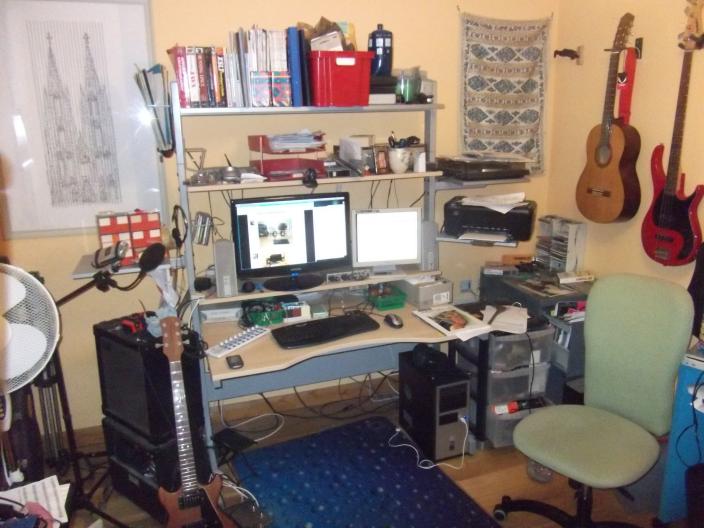 |
| The whole set-up |
Subscribe to:
Posts (Atom)